Saturday, 31 October 2015

Comparing Last week, 2 weeks ago sales

Comparing Last week, 2 weeks ago sales


1) Create calculated field like below,
Name: Last Week Sales
Syntax: if datediff('week', [Date_Field], today()) =1 then [Sales] end

2) Create another calculated field like below,
Name: 2 Weeks ago Sales
Syntax: if datediff('week', [Date_Field], today()) =2 then [Sales] end

3) Drag the Date field into work Area,Right click on Date field on the work area, then click on more (First more) then click on "Weekday"
4) Drag the above 2 calculated fields into work area.
5) Now you can see the what you want on the Report.

Saturday, 31 January 2015

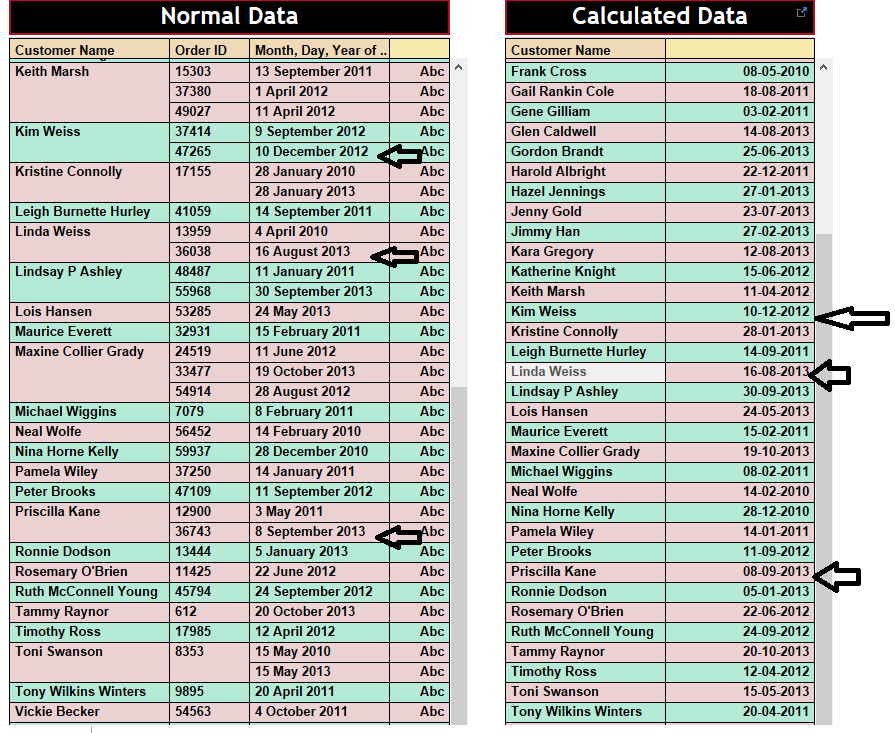
How to get the Latest Transaction date for each customer?


How to get the Latest Transaction date for each customer?

Procedure:

Here I'm creating 2 reports , 1 is to show Normal Report, another 1 is to show Calculated Report. Hence adding those 2 reports to Dashboard, which will show Latest Order customer wise.

1st Report (Calculated Report)
1) Create a Calculation 
Name: Max Date
Syntax: window_max(Max([Order_Date]))


2) Add fields [Customer_Name], [Order_ID]  to Row Shelf, drag Calculated field into Text Label

2nd Report (Normal Report)

1) Create a Report using  [Customer_Name], [Order_ID], [Order_Date].


Create a dashboard by dragging the above reports onto Dashboard.